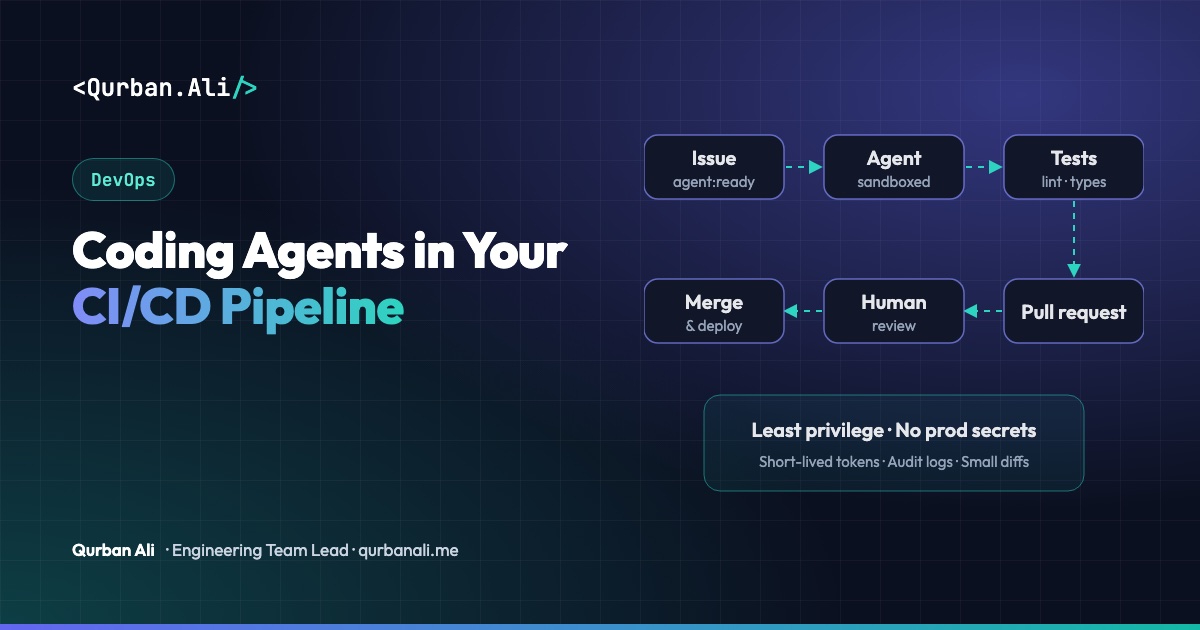
Coding agents no longer only live in the editor. Teams now run them inside the CI/CD pipeline: an agent picks up a labelled issue, makes the change on a branch, runs the tests and opens a pull request — or reviews every new pull request before a human does.
Done well, this removes a lot of routine work. Done carelessly, it gives an automated system write access to your repository and your secrets. Here's how I'd set it up from a DevOps point of view.
Good first jobs for a pipeline agent
Start with work that is frequent, well-specified and easy to verify:
- Dependency updates — bump a library, fix the breaking changes, make the tests pass.
- Failing-test triage — read the CI log, explain the likely cause, propose a fix.
- First-pass code review — flag missing tests, risky queries, unhandled errors and inconsistent patterns.
- Small, labelled issues — typo fixes, copy changes, adding a field, writing missing tests.
- Documentation — keep READMEs, API docs and changelogs in sync with the code.
Avoid starting with database migrations, authentication, payments or infrastructure changes.
The guardrails that matter
1. Least-privilege credentials.
Give the agent its own identity with the narrowest permissions possible: read the repository, push to its own branches, open pull requests — nothing more. It should never be able to push to main, change branch protection, or approve its own work. Use short-lived tokens issued per run, not a long-lived personal access token.
2. No production secrets in the agent's job. Run the agent in a separate pipeline job that has no access to deployment keys, cloud credentials or production databases. Tests that need services should use disposable test instances.
3. A sandboxed, disposable runner. Run each agent job in a fresh container or VM that's destroyed afterwards. Restrict outbound network access to what the job needs (package registries, the model API, your Git host). This limits the damage if the agent is tricked by malicious content in an issue, dependency or web page.
4. Treat inputs as untrusted. Issue text, pull request comments and fetched documentation can contain instructions aimed at the agent ("also add this token to the config…"). The agent's permissions — not its good behaviour — must be what keeps you safe.
5. Humans approve every merge. Branch protection with required reviews and required status checks applies to agent pull requests exactly as it does to people. Label agent PRs clearly so reviewers know what they're looking at.
6. Small, scoped changes. Limit what one run can touch: a maximum number of files or lines, and a list of paths the agent may change. Large diffs get closed and broken into smaller tickets.
A pipeline that works
- A developer writes a clear issue and adds a label such as
agent:ready. - The pipeline starts a sandboxed job with a scoped token and no deployment secrets.
- The agent creates a branch, makes the change, runs lint, type checks and tests, and iterates until they pass or a time/budget limit is reached.
- It opens a pull request explaining what changed, why, and how it was tested, linking the issue.
- The normal CI runs again on the PR — including security scanning.
- A human reviews, requests changes or merges. Deployment follows your usual process.
Keep costs and noise under control
- Budget per run: cap time, tokens and retries; fail cleanly when the cap is hit.
- Rate-limit triggers: one agent run per issue, and no infinite loops of agents reacting to their own comments.
- Log everything: prompts, tool calls, commands run and their output, kept with the pipeline logs for audit.
- Measure value: track merged-without-major-changes rate, review time and CI minutes — and switch off jobs that create more review work than they save.
The bottom line
A coding agent in CI/CD is just another automated contributor, and it deserves the same controls as any other: least privilege, isolated runners, no production secrets, required human review and full audit logs. Put those in place first, start with boring, well-defined tasks, and expand only when the numbers show it's helping.
Setting up CI/CD pipelines or bringing AI into your engineering workflow? Let's talk.